
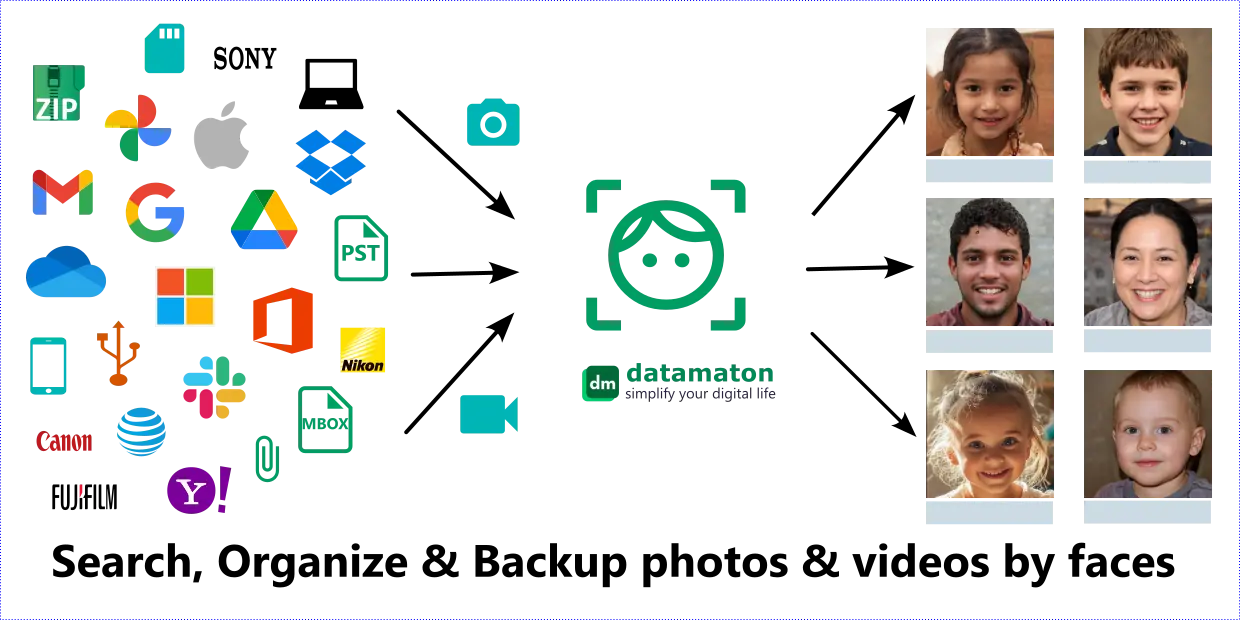
Photos and videos of friends & family are among our most prized digital possessions. The most convenient way to way to search, organize and manage them is, of course, through the people in them. Datamaton’s Knit products supports Artificial Intelligence (AI) based face detection and recognition. You can quickly find, organize and backup photos and videos scattered across 10+ years of local backups, emails and cloud storage or buried in ZIP & PST files.
Knit’s face detection capability is similar to what cloud photo storage providers like Google Photos provide, but with a few crucial differences:
- a) It is 100% private: Knit does all the work on your computer – not in the cloud. It saves face information to encrypted files on your computer. Only you have this password, and nothing about your photos or videos ever touches any cloud server.
- b) It is universal: Knit’s solution works for photos & videos across your local hard disks, USB drives, web based email, calendar and cloud storage accounts too. Hundreds of gigabytes of locally stored photos & videos are automatically covered.
- c) It finds photos & videos others can’t: Knit works with deeply nested photos & videos embedded inside ZIP, PST & MBOX files and email attachments. For example, Knit will even detect faces in a photo inside a ZIP file which is an attachment for an email that’s inside an MBOX file that’s inside a ZIP file that you downloaded from Google Takeout!
- d) You can organize and backup based on faces too, not just search: You can create a Virtual Folder based on face names that includes photos & videos from different storage locations. You can back-up the Virtual folder too.
e) The search is more sophisticated: This is not just because Knit unifies the search across all your storage locations. It is also because Knit allows you to specify a search that includes person A and B but not C or D.
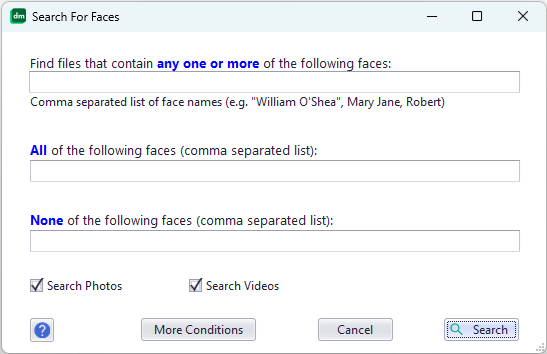

Unified photo & video search based on faces it contains.
You can also combine face search parameters with other search parameters too. For example, you can search for a picture taken within a date range and with a specific camera that contains the faces you want to search.
- f) It supports all major formats and raw images: Knit natively supports all major photo formats like JPG, PNG, BMP, TIF, SVG etc. It also supports raw image formats from major camera manufacturers like Sony, Canon, Nikon, Fuji, Kodak, Olympus etc. Vendor specific photo formats like Apple HEIC/PIC, Adobe Illustrator EPS/CR2 etc. are included. Similarly, it natively supports all major video file formats like WMV, MPG, MP4, AVI, MOV, Apple QuickTime, Matroska MKV, Macromedia Shockwave, 3GP, ASF, WEBM etc.
How It Works
Knit uses two separate AI Convolutional Neural Networks models – one to detect faces and another to recognize them. It copies these AI models to your own computer during installation, and uses your own computer to do this work. It runs background tasks at low priority to make sure your computer remains usable while it is doing face analysis. At a high level, face detection & recognition includes the following steps:
1) Detecting faces:
Knit attempts to detect faces each time it indexes a photo or video that’s enabled for this. So If Knit sees that an email it is indexing has a photo or video attachment, it will download the attachment to your local computer to perform face analysis (and delete it immediately afterword). Knit handles videos by extracting still images from it at periodic intervals and performing face detection on the extracted photos. It then attempts to remove duplicate faces of the same person present in different frames in the video, so that each face is reported only once in a video.
2) Recognizing faces:
Knit uses a different AI model to create a unique representation for each detected face. This representation is used to recognize if two faces in different photos or videos are the same person or not. These face representations are saved in index files stored only on your computer and encrypted with a password only you know. Each detected face currently takes ~6-10 kilobytes of disk space per face. So if Knit detects 100-thousand faces across all your Data Sources, it will need at least ~600 MB of free disk space on your computer to store face information.
3) Grouping faces:
In this step, Knit attempts to group together all the faces of a single person present in different photos & videos. It does so by comparing the face representations from step 2) above to detect if two faces belong to the same person.
4) Assigning a name to a face:
In this step, you use the Knit User Interface (UI) to assign names to faces. There are two menu options to do this:
a) Use the “View Or Assign Names To Faces in” menu option to do this for a specific Data Source.


Menu option to view or sssign names to faces in a Data Source
b) Select a specific photo or video and right click on it to bring up the file specific menu. Then use the “Assign Face Names” menu option.


Menu opton to assign face names in a specific photo or video
In both instances, Knit will display a screen with the detected faces. You can type in a name in the space just below the face (red boxes in the image below).
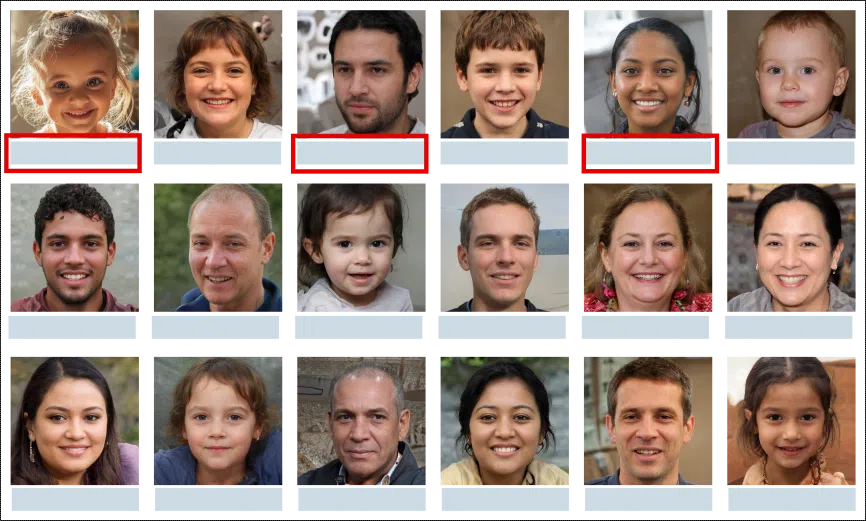

Assign name to displayed faces
5) Propagating a face name to all photos & videos where it appears:
. When you name a face in step 4), Knit will locate all the photos & videos in which this person appears. It will automatically add the face name tag you’ve just assigned to each such file.
6) Periodically merging different face-groups that represent the same person:
Sometimes, Knit can end up creating multiple face-groups for the same person. To rectify this, Knit will periodically attempt to find and merge them. All the faces in the merged group automatically inherit the face name tag you assigned to any member of the merged face-group.
Hardware Requirements
We constantly hear about the incredibly powerful chips needed to train AI models. Fortunately, using the AI models to detect and recognize faces is less intensive and can be done on your home computer. In fact, AI face detection is now built into much less powerful cameras & doorbells! Still, detecting and recognizing tens or hundreds of thousands of faces from as many photos or videos is still fairly compute and memory intensive. This is especially true for videos – as Knit may have to extracts hundreds of frames from it – and raw images, as these are very big files.
We recommend you use a “reasonably modern” computer – from year 2020 or later – with a CPU that has multiple cores or threads, at least 8GB of memory and a solid-state (SSD) hard disk. Knit’s implementation is highly optimized towards running on home computers (not servers). It will run its background tasks at a low priority so you can continue to use your computer for other work. Also, it will seamlessly scale to use available resources, so it will work faster on a more capable or less busy computer.
What Affects The Results
AI based face detection and recognition models have made tremendous progress in the last few years. However, their effectiveness can still get affected by a number of factors like:
- Light conditions: a person’s face in a photo or video taken in very bright or low light conditions may not match the same person’s face in a photo taken in different light conditions.
- Partially obstructed faces: If a face has a shadow on it or is partially obstructed by sunglasses, hats, scarves or other objects in front, it may not match the same person’s face in other photos or videos.
- Side faces: these are notoriously hard to match, and Knit actually skips them when grouping faces due to the high rate of matching errors.
- Age tracking: Another aspect that often doesn’t work is “tracking” a person’s face through widely different age ranges. So if you have photos of the same person as a baby, child, adolescent and adult, the current AI models may not match the baby face with the adult face of the same person.
- Twins, triplets, close siblings. . .: AI models have gotten better – but can still get tripped up – at recognizing as separate people twins/triplets and siblings very close to each other in age.
Knit will strive to stay up to date with the state of the art as AI models evolve to newer, better and faster versions.
Frequently Asked Questions
Do you use your own AI face detection and recognition models?
No, we use industry standard AI models that were created by full-time researchers. We may change the specific models we use over time, but will always download them to your own computer to do the actual work.
How much time does face detection & recognition take?
It takes less than 1 second to detect faces in a small size photo (~3 megabytes or less) and ~1-5 seconds for a medium sized photo (less than 10 megabyte). Large photos (20+ megabytes) – especially in raw format – can take upto a minute per photo. Videos are more time consuming – it can take Knit several minutes to extract several hundred still images from a ~5+ minute long video before it can process them.
However, the most time consuming part is grouping together the same person’s face in different photo & video files. This essentially requires Knit to compare each detected face with every other one to see if they belong to the same person! Grouping 100,000 faces for the first time can take ~30+ minutes! Incrementally adding newly detected faces after this initial grouping is much less expensive. Lastly, propagating a face name tag to all the photo & video files that contain that person’s face can take several minutes.
Please note that these numbers are very rough approximations! Since Knit uses your own computer to do the work, these numbers are heavily influenced by your comptuer’s capabilities and what else is running on it. These representative numbers are for “reasonably modern” (2022+) computers with 4+ cores, 8GB+ memory and an SSD hard disk.
Which photo and video formats do you support?
All the major ones including RAW files – see some of the example formats listed above.
Why are some detected faces fuzzy or blurred?
This can happen for faces detected in videos. When Knit extracts still images from a video, it can sometimes capture an image at the exact time instant when a person was moving in the video. This can lead to blurred faces – which then end up not matching other instances of that person’s face in other photos & videos.
Where is the face information stored? Can Datamaton Inc. leak, share or sell it?
Face information is stored encrypted and only on your own computer. The original photo/video or the detected face information is never sent anywhere for any reason. Datamaton cannot leak, share or sell something it never had in the first place.
Can I opt-in and opt-out of detection? Can I delete saved face information?
Yes. You can enable or disable face detection on a per-Data-Source basis. If you opt-out, Knit will delete saved face information for that Data Source and disable future face detection for it. If you opt back in, Knit will re-detect faces for that Data Source, even for photos and videos that were already previously indexed. Knit also allows you to delete saved face information independent of enabling/disabling face detection. You can delete saved face information for a specific Data Source or for all of them.
Why does Knit sometimes ask me to to name the same face multiple times?
It may be obvious to you that two faces are the same person, but the face recognition model may not be as sure. Different light conditions, shadows, different camera angles or partially obstructed faces might lead the model to assign a lower confidence value on two faces being the same. Knit considers false matches to be more serious that missed matches, so it uses a relatively high bar to decide if two faces are the same. This can mean that you have to name the same face multiple times. If you give them the same name, of course, a face search with that name will include them all in the search results.
Does Knit edit or update my photos/videos (e.g. to add name tags)?
No, Knit only reads your photos and videos and will not change them in any way. Any names you associate with faces in a photo or video are added as tags to Knit’s index files only. Knit will not attempt to add the face name tags to the EXIF, IPTC, XMP etc. metadata inside the corresponding file itself. This is by design – many photos and videos have complex internal structures that can be corrupted by any attempt to add tags. Editing a file to add name tags would change its file date – something Knit doesn’t want to do as we often look at file dates to figure out when the photo/video was taken. In any case, Knit cannot edit or update the photos and videos that are email attachments, embedded inside ZIP or PST files etc.
Does Knit detect children’s faces? Can I control this?
Yes, Knit detects children’s faces too. The ability to search, organize and backup up our baby/toddler photos is one of the biggest usage models for face detection! Knit allows you to enable or disable face detection on a per-Data-Source basis. There is no separate control to enable or disable children’s faces specifically.
Download the free, trial or paid version of Knit.